
Jira offers a native work items archiving feature (available on Jira Cloud Premium & Enterprise plans) that allows users to archive individual work items or spaces. When a work item is archived, it is hidden from standard Jira search (JQL), boards, and backlogs, while remaining accessible via direct URL.
QAlity and QAlity Plus do not currently officially support Jira’s native work item archiving. Due to platform API limitations, archived test cases may behave non-deterministically across different modules within the app.
Issue Description
If you archive a Jira work item that is used as a Test Case, you may experience inconsistent behavior within QAlity and QAlity Plus:
-
Non-deterministic visibility: Archived test cases may still appear in some views or custom reports while being completely omitted from others (such as test repository lists, execution cycles, or test case search).
-
Execution & modification limitations: While direct links to archived test cases still open the Jira work item view, performing actions such as adding test executions, updating test steps, or modifying test data may fail or produce unexpected results because Jira places archived work items into a read-only state.
-
Loss of traceability: Once archived natively, test cases are excluded from standard JQL queries, which can skew test coverage metrics, sprint reports, and traceability matrices.
Recommended Workaround: Status-Based Lifecycle (Best Practice)
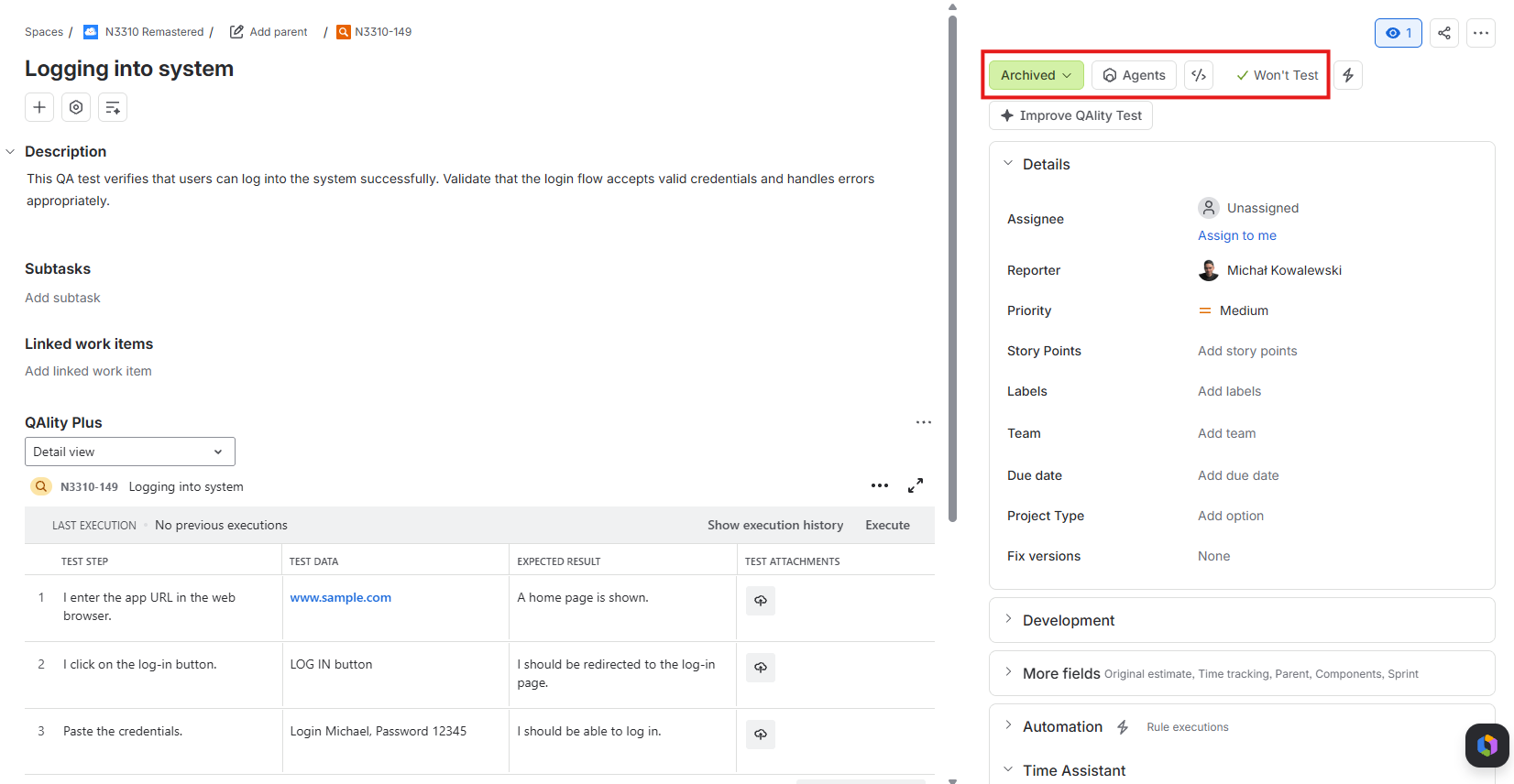
Instead of using Jira's native Archive work item action, we strongly recommend managing obsolete or retired test cases using a dedicated workflow status and resolution.
This approach ensures 100% consistent behavior across all QAlity views, preserves full historical reporting, and works seamlessly across all Jira Cloud subscription tiers.
Step 1: Add a dedicated status to your Test Case workflow
Create a custom status in your Jira workflow to represent retired test cases, for example:
-
Deprecated -
Obsolete -
Archived (Status)
Step 2: Set a proper Resolution
Configure the transition to set a clear resolution flag when moving a test case to the retired status, such as:
-
Obsolete -
Won't Test -
Retired
Why is this recommended over native archiving?
-
Full Traceability: Historical test execution results remain intact and accessible in reports and audit logs.
-
Predictable Filtering: You can easily include or exclude deprecated tests in QAlity Test Repository filters, Jira filters, and JQL queries (e.g.
issuetype = "Test" AND status != "Obsolete"). -
Universal Compatibility: Works across all Jira plans (Standard, Premium, Enterprise) without relying on Jira's native archiving APIs.
What to do if you already archived Test Cases in Jira?
If you have already archived test cases using Jira's native archive feature and are experiencing visibility or execution inconsistencies, you can restore them:
-
Locate the archived issue in Jira (via direct link or via Jira's Settings ⚙️ → System → Archived work items / spaces archive settings if you have Admin permissions).
-
Click Restore issue from the work item actions menu (
...). -
Once restored, transition the test case to your project's
DeprecatedorObsoleteworkflow status instead.