
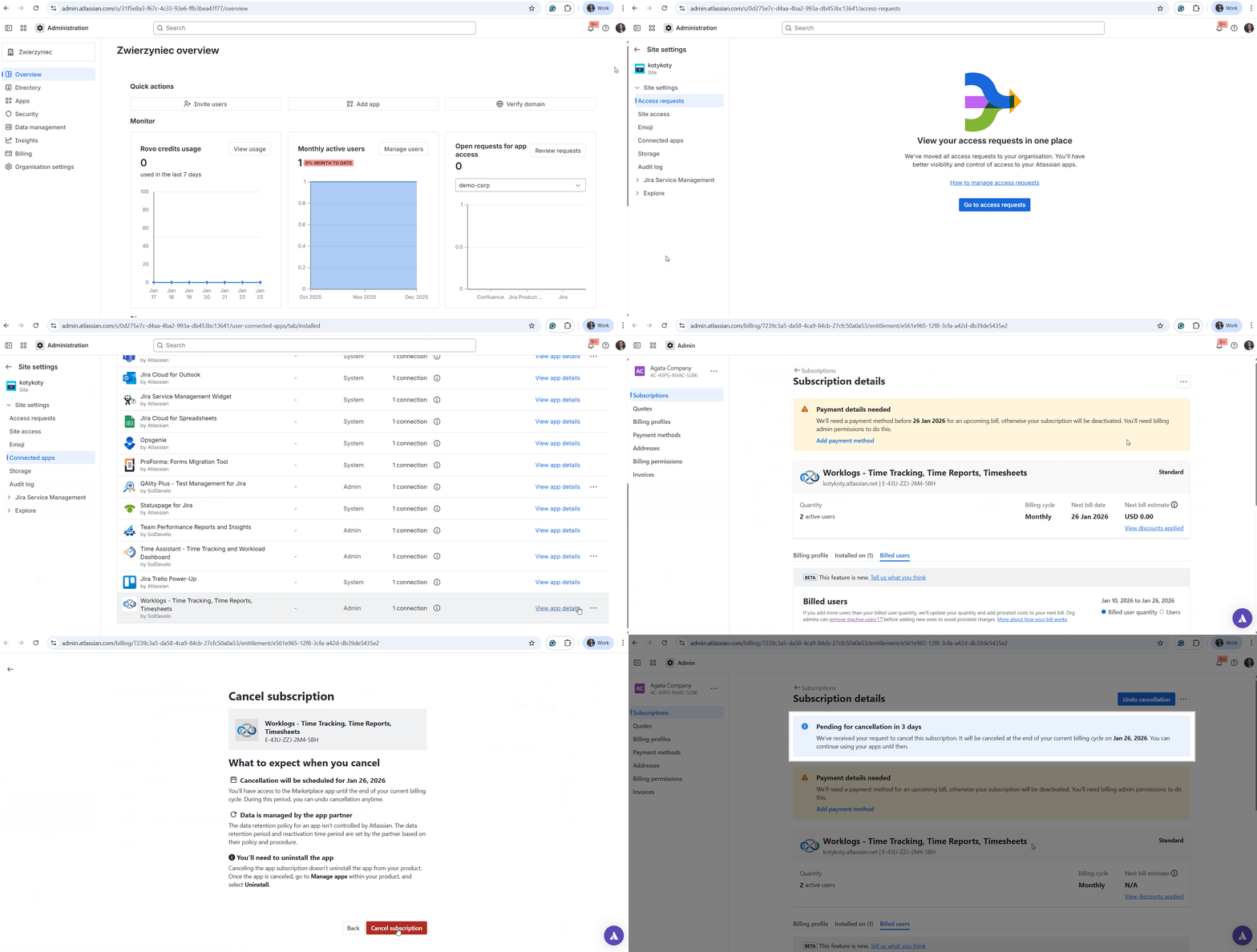
To retire the app, you must first cancel your subscription through the Atlassian billing system. This can be done directly from your Jira settings:
-
Go to admin.atlassian.com.
-
In the top menu, navigate to Apps, select Sites, and click on the specific instance where the app is installed.
-
From the left-hand sidebar, select Connected apps. Search for Worklogs - Time Tracking, Time Reports, Timesheets and click View app details.
-
Click the Unsubscribe button.
-
On the following page, click the three dots (...) in the top-right corner, choose Deactivate, and confirm by selecting Cancel subscription.
-
You will be given the option to select a reason for your cancellation. We truly value your input, so please consider leaving a comment before clicking Submit feedback or closing the window with Close option.
-
You will be redirected back to your billing page, which will display the exact date your subscription will be officially terminated by Atlassian.
If you would like to delete the subscription immediately and not wait for the cancellation period, contact the Atlassian billing team. Upon your request, they can immediately delete the app subscription.
Do you have any questions or feedback? Feel free to contact us here 💡