.png)
As of 23 March 2026, Multiple Checklists for Jira Cloud has been upgraded to run on Forge - Atlassian’s next-generation cloud app platform.
Forge is a serverless, cloud-based platform that helps deliver a faster and, most importantly, more secure experience by handling key aspects like security, compute, and storage.
This change also aligns with Atlassian’s decision to discontinue support for Connect (the previous platform used by many Jira Cloud apps): Announcing Connect End of Support: Timeline and Next Steps
What does it mean for you?
Display changes
After the move to Forge, Checklists may no longer appear automatically in the work item view.
To open Checklists in a work item:
-
Open the work item.
-
Go to Apps → Checklists
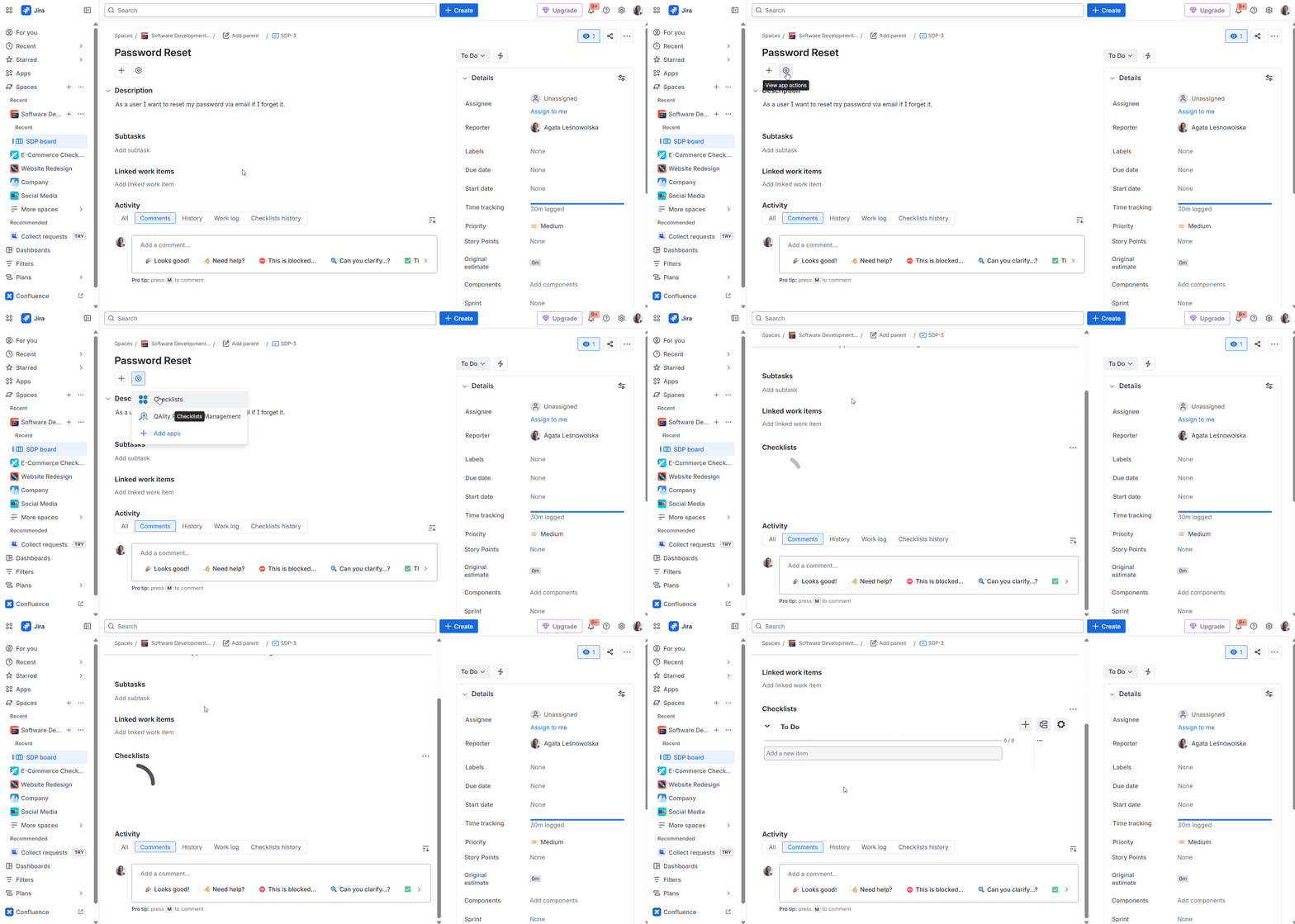
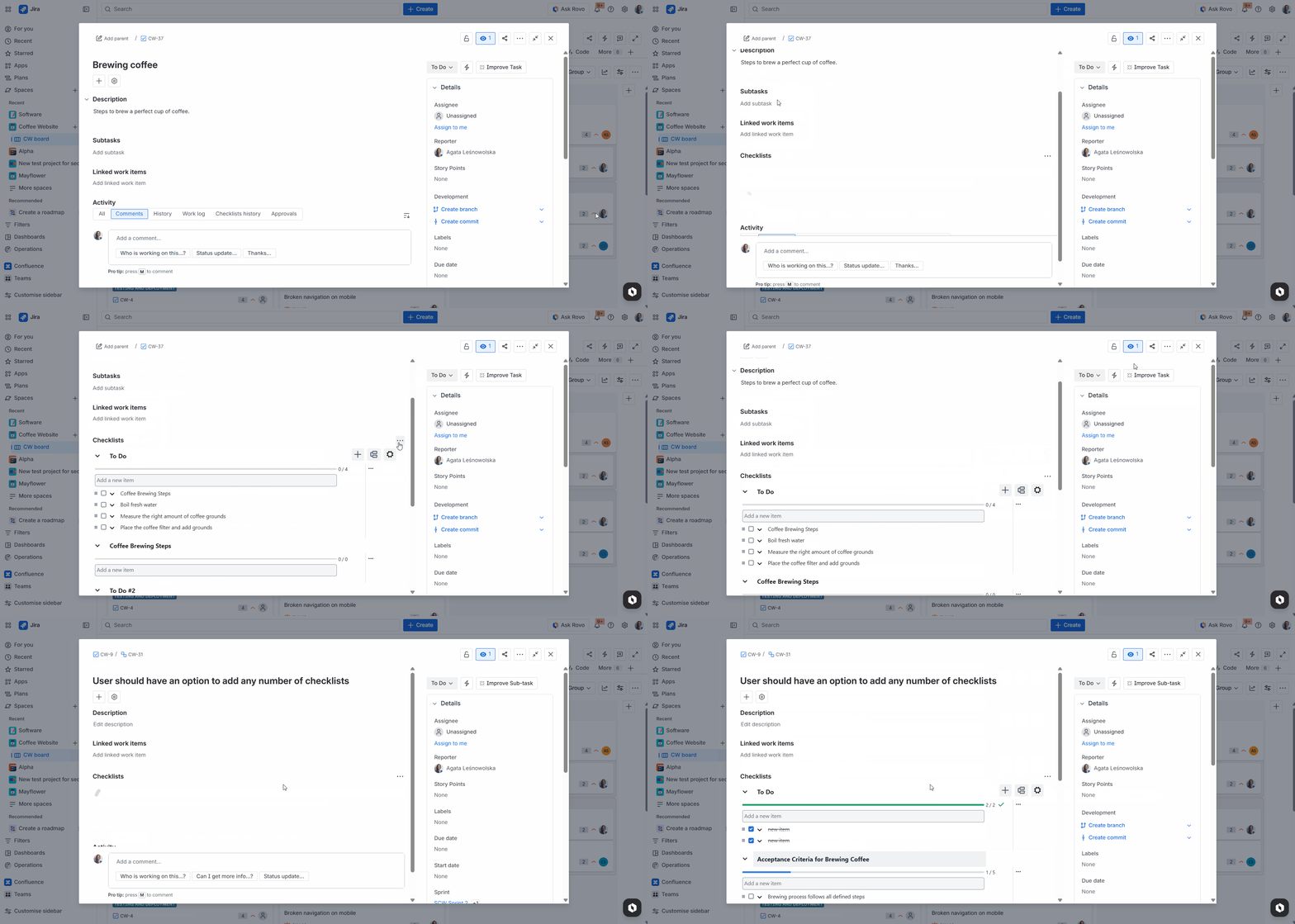
To show Checklists by default for everyone in a project (new option):
-
As a Project Admin, open any work item in the project.
-
Open Checklist actions
-
Enable Show for all work items
Configure firewall and VPN for new Forge URL’s
In case your company uses a firewall, antivirus, or VPN that blocks certain IP ranges, you need to make sure the IP’s used by Jira are whitelisted. You can read more details in this official documentation: IP addresses and domains for Atlassian cloud apps
If you face further issues, these are the specific IPs you will need to enable in your firewall config:
104.192.136.0/21
185.166.140.0/22
13.35.248.0/24
13.227.180.0/24
13.227.213.0/24
These IP’s are based on the official recommendation by Atlassian in this ticket: https://jira.atlassian.com/browse/ECO-663
URL changes
The following pages provided by Multiple Checklists for Jira will have new URLs after March 23, 2026. The user interface will automatically use them, however if you store the direct links to our app anywhere (e.g., as browser tabs), you will need to update them to access the app. You will be able to copy the new links directly from your browser, and you can also see the preview of the changes in the table below.
|
Page |
Before |
After |
|---|---|---|
|
Manage templates |
https://<SITE>.atlassian.net/plugins/servlet/ac/com.soldevelo.apps.checklists/manage-templates-page |
https://<SITE>.atlassian.net/jira/apps/8cb6a059-d338-4238-a45d-70b9ba38cdfa/70ed2f75-39d7-4b67-82d4-0032a0cf48af |
|
Settings |
https://<SITE>.atlassian.net/plugins/servlet/ac/com.soldevelo.apps.checklists/settings-page |
https://<SITE>.atlassian.net/jira/settings/apps/8cb6a059-d338-4238-a45d-70b9ba38cdfa/70ed2f75-39d7-4b67-82d4-0032a0cf48af |
|
Checklist item statuses |
https://<SITE>.atlassian.net/plugins/servlet/ac/com.soldevelo.apps.checklists/statuses |
https://<SITE>.atlassian.net/jira/settings/apps/8cb6a059-d338-4238-a45d-70b9ba38cdfa/70ed2f75-39d7-4b67-82d4-0032a0cf48af/statuses |
|
Checklists permissions |
https://<SITE>.atlassian.net/plugins/servlet/ac/com.soldevelo.apps.checklists/checklists-permissions |
https://<SITE>.atlassian.net/jira/settings/apps/8cb6a059-d338-4238-a45d-70b9ba38cdfa/70ed2f75-39d7-4b67-82d4-0032a0cf48af/permissions |
FAQ
Our Customer Care team is available every working day to answer any questions you may have regarding this update. They can also help you update and navigate the changes for your team.
Feel free to get in touch here - Other Questions🎧