.png)
Our App has been fully migrated to Forge and gained Runs On Atlassian badge, confirmin that our architecture is fully integrated with Atlssian Jira, and no customers data are stored or sent outside your Jira instance. Read the section below to find out mora about our migration.
If you are using versions 6.6.0 or lowe please contact your Jira admin for manual update of the app required by Atlassian. Find out more on which features you are missing and how to update the app here:Manual update required for Worklogs Cloud versions 6.6.0 or lower
We’re upgrading our app to run on Forge, the next-generation cloud app platform from Atlassian. Forge is a serverless, cloud-based platform that allows developers to build and deploy apps and integrations for Atlassian products like Jira, Confluence, and Bitbucket, handling aspects like security, compute, and storage, eliminating the need for developers to manage their own infrastructure.
This change will bring you a faster and, most importantly, more secure experience.
It is also important in view of the Atlassian’s decission to discontinue support of Connect - the main development platform for current Jira apps.
Why we’re excited
By moving to Forge, we can deliver new features faster, ensure top-level security, and provide a more stable experience - so you can focus on your work without worrying about the technology behind it.
What does this mean for you?
Higher security and Data protection
Forge uses Atlassian’s secure, isolated hosting. Your data stays within the Atlassian Cloud, benefiting from the same security standards Atlassian applies to their own products.
Compliance and Data residency
Your data will be stored in the same region as your Jira or Confluence instance, helping you meet compliance requirements.
Better performance and reliability
Our app will run directly on Atlassian’s infrastructure. This means faster loading times, less downtime, and a smoother user experience.
Future-proof technology
Atlassian is investing in Forge as the main platform for all new features. Migrating now ensures you’ll always get the latest improvements and capabilities.
No extra effort from you
You don’t need to install anything or change your setup. The transition after the Admin’s update will be seamless, and won’t interrupt your work.
What action is required to update your Worklogs
-
Jira Admin’s action - since migration of Worklogs to the newest Atlassian platform is considered a major update, you need to contact your Jira Admin and ask them to accept it. Once confirmed, the app will upgrade automatically, and no data, configuration, or saved reports will be lost. You’ll still be able to find them in the Saved reports section of the app.
-
Shared URLs update - with the move to Forge, our app’s URL will change, and so will all shared links to your reports. This rule applies to all Marketplace apps migrating to the new platform. If you have shared any reports via link or saved them in your browser, simply open the report in the Saved reports section and reshare them with your stakeholders.
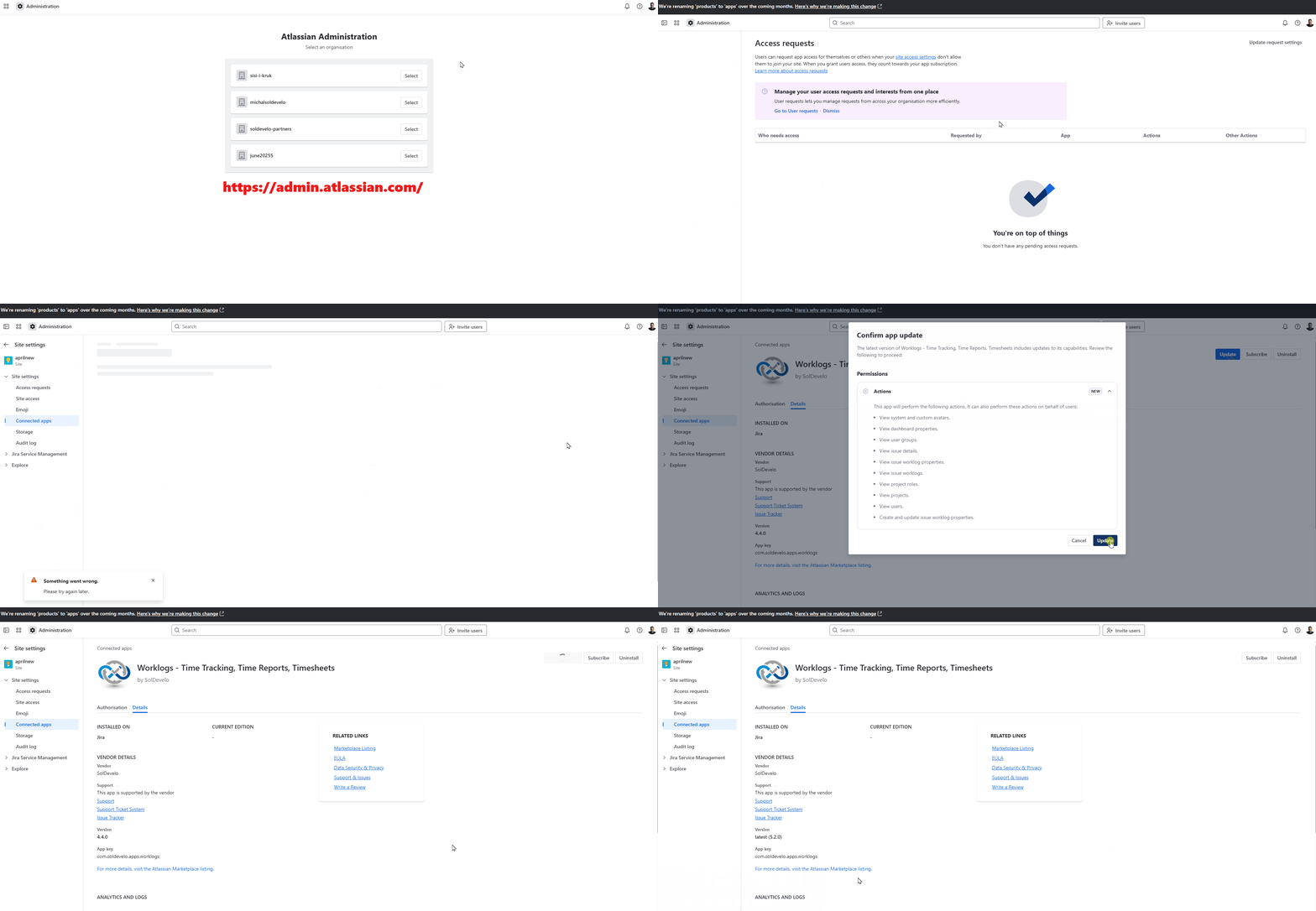
How a Jira Admin can update to Forge
Go to admin.atlassian.com → Apps → Sites → Choose your site → Connected apps → Worklogs (view app details) → Update.